I built a page that spies on you
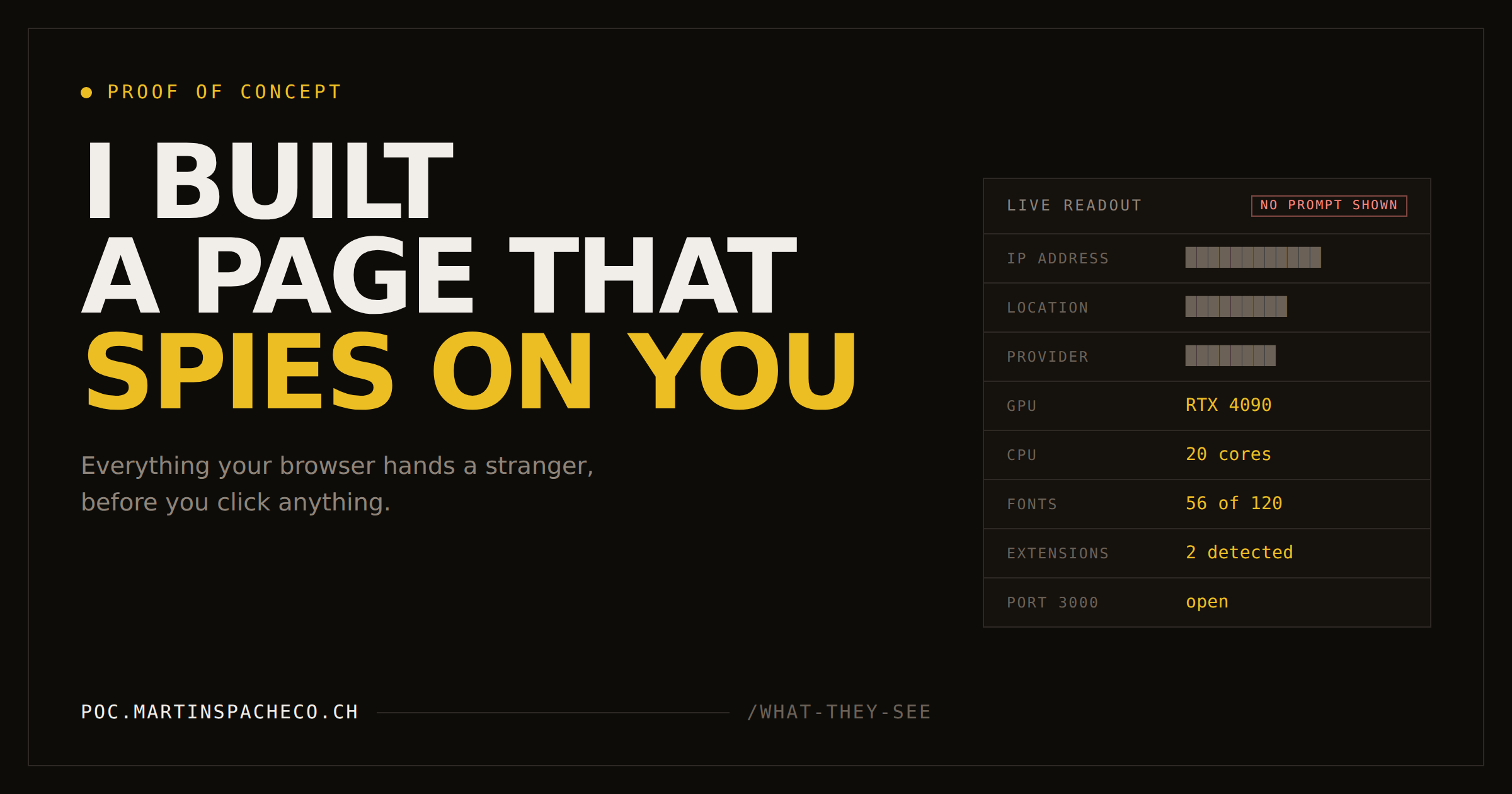
I built a single HTML file that reads everything a website can learn about a visitor, then ran it against my own setup: Brave, Do Not Track, a DNS sinkhole for the whole flat. My IP address came back blocked. Three sections further down, the page had it anyway.
Then I asked its visitors for permission first, which does take some of the fun out of it.
Some context. The idea turned up while I was working through a TryHackMe room, which is where most of my half-decent ideas seem to turn up. I'd been reading around browser fingerprinting for a while, and the writing on it comes in two flavours. There's the academic work, thorough and basically unreadable unless you're already in the field. And there's the blog post genre, which tells you websites can track you, gets a bit ominous about it, then recommends a VPN. Neither one gives you the feeling of it, and the feeling is sort of the whole point.
So I made a page that just shows you.
One HTML file. No backend, no database, nothing logged anywhere. You open it, it reads whatever a website is technically able to read about you, and prints all of it on screen with an explanation of what each value is, how it gets used in practice, and whether you can do anything about it. Claude did a good chunk of the typing, which I'd rather mention than not.
poc.martinspacheco.ch/what-they-see
It asks you to agree before reading anything, which isn't me being delicate. Under GDPR and ePrivacy, fingerprinting counts as accessing information on someone's device and needs consent, cookie or no cookie. The EDPB spelled that out in Guidelines 2/2023, which confirms Article 5(3) covers any access to terminal equipment and is not limited to cookies. Writing a page about consent theatre and then skipping the consent would have been a bit much.
Obviously I ran it on myself. My setup isn't paranoid but it isn't nothing either: Brave rather than Chrome, Do Not Track on, and AdGuard Home doing DNS filtering for every device in the flat.
The first bit looked like a win
Top of the page is the network section, and it came back mostly empty.
IPv4              blocked or offline
IPv6              none returned
Autonomous system unavailable
Network operator  unavailable
Country           unavailable
Region / city     —
Postal code       —
Coordinates       —
The page tries three separate public geo-IP services to show you your own address, because there's no other way to do it from inside a browser. AdGuard had blocked all three. The lookup source row said so plainly: all three geo-IP providers were blocked or unreachable.
Further down, 10 of the 12 advertising and analytics hosts the page probes were blocked too. Retargeting, analytics, tag manager, product analytics, session replay, the customer data platform, all dead.
At which point I felt quite good about myself for roughly forty seconds.
Everything that wasn't a network request came through untouched
Because blocking DNS decides which hosts your machine may contact. That's the entire job. It's a doorman with a list, and it has no opinion at all about what you say once you're through the door.
So while the IP section sat there empty, the rest of the page filled in:
An NVIDIA GeForce RTX 4090, by model number, straight out of the driver string. Twenty logical cores and 64 GB of RAM. 1920×1080 with two additional monitors attached. Windows, Brave 151. Audio hardware at 96 kHz across eight output channels, which is unusual enough to be a decent discriminator on its own. Widevine at L3, meaning software-only DRM rather than a hardware-backed secure path, which is what keeps streaming services from serving their higher resolutions and tells a fraud engine what class of machine it's looking at. Three text-to-speech voices, the stock Windows English set, which would read out identically in Chrome or Firefox on this same computer.
None of that is a request to a server. It's my browser answering questions from JavaScript running on a page I chose to open. There's nothing for a blocklist to block.
Then it worked out what I do for a living
The font section renders a test string in about 120 families and measures how wide the box comes out. Width changes, you have the font. Mine came back with 56 installed, the full Microsoft Office set among them, and then Cascadia Code, Cascadia Mono and JetBrains Mono.
Those are programming fonts. Nobody installs JetBrains Mono because they liked the look of it in a dropdown.
A different section reads objects that browser extensions inject into pages. Anything an extension puts into your DOM is visible to the page it put it into, which is a fact I knew perfectly well and had somehow never applied to myself. Mine came back with React DevTools and Phantom. So: builds React apps, holds a Solana wallet.
Two techniques with nothing in common, agreeing. That's the part worth sitting with. One fact about me is trivia. Two that corroborate is a profile, and building profiles out of fragments like that isn't hypothetical, it's an industry with revenue targets.
And my IP wasn't actually hidden
This is the bit that made me stop and go back through the export properly.
The IP row said blocked. Three sections further down, under WebRTC, sat this:
Public address (STUN)   [REDACTED]      my real public IPv4
                        [REDACTED]      and an IPv6 alongside it
Both of them, in full, in a section three scrolls below the one that had just told me my address was blocked. The IPv6 is the one most people don't realise they have, and it tends to be far less filtered than the v4.
WebRTC is the browser machinery behind video calls. To connect two people it has to work out every network path your machine has, so it asks a STUN server what the outside world sees. A page can kick that process off without ever making a call and just read the answers.
My blocker had stopped the page asking a geo-IP API for my address. It had not stopped the page asking a STUN server. Front door locked, side door wide open, and the same value came through either way.
Worth being clear about what the blocking did and didn't buy me there. It genuinely stopped three third-party companies from learning my address, and that's not nothing. What it did not do is hide my address from the site itself, because a site doesn't read your IP so much as receive it. It's the return address on the connection, and it arrives before any HTTP request exists. Every server you talk to has it whatever your blocklist says.
So I switched the filtering off to see the difference
Same page, same browser, same machine.
The network section filled in immediately. My city, correctly. My internet provider by name, flagged as a residential line rather than a datacentre, with its AS number. A postcode. Latitude and longitude to four decimal places, with a link to open the spot on a map. All of it [REDACTED] in this post, for reasons I'd hope are obvious by now.
The blocked-host count dropped from 10 of 12 to 4.
Which tells you two things at once. The sinkhole was doing real work, more than I'd credited it with. And those remaining 4 weren't AdGuard at all, since it was off. That's Brave's built-in blocking, quietly handling a third of the list on its own.
Two hosts got through in both configurations:
pagead2.googlesyndication.com
securepubads.g.doubleclick.net
Google's two primary ad-serving domains, answering in about a millisecond each. Criteo, Taboola, Hotjar, Segment, Mixpanel and Facebook all got caught somewhere. The two biggest ad servers on the internet were the two neither layer stopped.
There's also a small joke buried in the unblocked run. The lookup source row now read: ipwho.is, a third-party API. Note that by loading this page you have now also told ipwho.is your address. To show me my own IP, my browser had to give it to somebody else.
My blocker announced itself to the page
This was the sharpest single result and I hadn't expected the page to catch it at all.
It probes a domain called use-application-dns.net. That's Mozilla's canary domain: Firefox looks it up at startup, and if the answer comes back NXDOMAIN it turns DNS-over-HTTPS off and carries on using whatever resolver the network handed it. Pi-hole, AdGuard Home and NextDNS all block that domain by default, specifically so Firefox doesn't route around them.
With filtering on, it failed in 11 ms. With filtering off, it resolved normally in 269 ms.
So my privacy tool told a web page it existed, while in the middle of protecting me from that page. There's no bug here and no fix. It's just the shape of the problem: every defence you deploy is itself observable, and "runs a DNS sinkhole at home" is a considerably rarer attribute than "doesn't". A tracker that can't reach you can still write down exactly how you're avoiding it.
Deleting cookies doesn't help either
Everyone's been trained on cookies. We click the banners, pick "reject all", clear them occasionally, feel briefly virtuous.
A cookie is a file a site leaves on your machine. Fingerprinting doesn't leave anything. It works out who you are from how your particular combination of hardware and software behaves: how your graphics driver rounds a floating point number, how your audio stack processes a tone nobody hears, what your JavaScript engine says when it throws an error, how wide your fonts render.
There's nothing to delete. That's rather the point.
I have two exports from this machine with the stored visitor ID different between them, because site data got cleared in between. The composite fingerprint is byte for byte identical in both, and the second time the page greeted me with identical fingerprint seen before, you have been recognised. Nothing was saved to make that work. It measured me twice and got the same answer.
A few other things in that section that get strong reactions from people I've shown it to.
Battery level used to be a supercookie. Olejnik, Acar, Castelluccia and Diaz published The Leaking Battery in 2015, and found roughly 14 million distinguishable combinations of the Battery Status API's properties: about 40,000 possible discharge-time values against 90 battery levels. Those values only refresh every 30 seconds, which is plenty long enough to recognise the same person across two sites visited close together. It's a short-lived identifier rather than a permanent one, but it needs no storage at all, which means clearing cookies does nothing to it. The Register's write-up has the numbers if you don't want the paper.
Firefox cut web content's access to the API in version 52, and the Bugzilla thread says why in as many words. Chrome and Edge still ship it. Safari never did. caniuse keeps score.
The GPU introduces itself by name. Not "a GPU", the actual driver string: ANGLE (NVIDIA, NVIDIA GeForce RTX 4090 (0x00002684) Direct3D11 vs_5_0 ps_5_0, D3D11). No prompt, just a function call.
That one is worth an asterisk, and it's a hopeful one. Brave started replacing the WebGL vendor and renderer strings with a single generic value in version 1.93, on by default, in a phased rollout that began in August 2026. My export still has the full model number in it, so that change either hadn't reached me yet or wasn't applying to this page. If you run the demo on a current Brave and the GPU row comes back generic, that's the fix landing, not the page failing.
And the one that actually bothers me. CSS exposes accessibility preferences including prefers-reduced-motion, forced-colors, prefers-contrast and inverted-colors. A stylesheet can read them. No JavaScript required.
I'm not going to invent a percentage, because I couldn't find a solid one. But the mechanism doesn't need a number. These settings exist for people with vestibular disorders, migraine, photosensitivity or low vision, most people never touch them, and anything most people leave at default makes the people who change it stand out. The features built to help disabled users are the features that single them out, and there's no version of "just turn it off" that's a reasonable thing to ask.
The bit that should actually concern you
I want to be careful here, because writing the frightening version of this and stopping would be easy and not very useful.
One website knowing my graphics card is not a crisis. It's mildly creepy and mostly useless on its own.
What makes it matter is that the data doesn't sit with one site. It sits with an industry that spends real money joining it up. Ad networks sync identifiers by bouncing your browser between them inside invisible pixels. Every ad slot you load broadcasts your identifiers and rough location to a long list of potential bidders, most of whom don't bid and all of whom receive the record anyway. The Irish Council for Civil Liberties has measured the scale of this and calls it the biggest data breach ever recorded, which sounds like activist framing until you read how the auction actually works. And now that third-party cookies are on the way out, the replacement is identifiers derived from your email address, which work across sites and across devices, and which you hand over yourself every time you sign in somewhere.
Fingerprinting is the glue. Its commercial job is repairing the identity graph after you clear your cookies.
Nobody in that chain does anything dramatic, which is the uncomfortable part. Each step is a small defensible transaction between two companies. What comes out the far end is a surveillance system nobody designed and nobody is accountable for.
Let's not be ridiculous about it though
If a post like this ends with "so stop using the internet", it's failed. Nobody's doing that and nobody should have to.
Almost all of this is boring commercial surveillance rather than anyone hunting you personally. Being uniquely identifiable is not the same as being targeted. For most people the realistic outcome is worse ad targeting, some price discrimination, and their data turning up in a breach dump in four years. That's bad, but it's a different sort of bad from what the word surveillance makes people picture.
Your threat model matters more than the technology. A journalist protecting a source, someone leaving an abusive relationship, and someone who just doesn't want a mattress company following them around for six weeks need completely different things. Most of us are the third one.
And a fair bit of the defensive work is going well, which nobody writes posts about. Cache partitioning, state partitioning, SameSite cookie defaults and site isolation have closed off an entire family of cross-site attacks in about five years. The section of my page on history sniffing is mostly a museum exhibit now.
What actually helps
Ranked by how much each one changed what my page could collect, rather than by how good the marketing is.
| Measure | Effect | Reality check |
|---|---|---|
| Tor Browser | Very high | Slow, some sites block it, and whatever you do don't customise it |
| Boring default configurations | High | Free. Puts you in the biggest available crowd |
| uBlock Origin | High | Blocks the requests that carry the data away |
| Brave | High | Randomises canvas, audio and WebGL per site and per session, so you look like a different person everywhere. From 1.93 it also hides the GPU strings |
| Firefox with strict ETP | High | Normalises instead of randomising, so its users resemble each other. Strong partitioning plus a known-fingerprinter blocklist |
| Separate browser profiles | High | Stops work, personal and shopping being one person |
| A different email alias per service | High | Goes straight at the cookie replacement |
| Permission hygiene | High, but only for the prompted things | Revoke camera, mic and location when you're done with them |
| DNS filtering | Medium | Cut my tracker hosts from 12 reachable to 2, and did nothing whatsoever about the rest of this page |
| VPN | Low to medium | Changes one line and leaves everything else exactly as it was |
| Private browsing | Low | Doesn't hide you from sites at all |
DNT header |
None | Ignored by everyone, and it makes you marginally rarer |
That VPN row will annoy somebody, so to be precise: a VPN is worth having on hostile Wi-Fi and worth having to keep your traffic away from your ISP. It does nothing about your fingerprint, your fonts, your GPU, your extensions or the way you move your mouse. The advertising is about a decade ahead of the mechanism.
The one idea I'd want anyone to take away: you can't win by being unusual. The instinct is to install five extensions that each randomise something, and that makes you more identifiable rather than less, because hardly anyone does it and the inconsistencies show. My DNT: 1 is a tiny version of the same mistake, and my sinkhole announcing itself through the Mozilla canary is a slightly larger one. Anonymity is a crowd problem. The goal is to look like everyone else.
Have a look yourself
It's one file, so open it in a text editor if you like. Every claim on that page is either code you can read or is marked described, not executed, and there are a handful of techniques in there I documented deliberately without running, because pointing them at a real visitor would be rude rather than educational.
poc.martinspacheco.ch/what-they-see
Everything above is the half that needs nothing from you. There's a second half that does: precise location, camera, microphone, screen capture, clipboard, the full font list, USB and Bluetooth devices. None of it runs until you press a button, and what comes back depends on what you allow and which device you pick from the chooser. That's rather the point of putting it there. One dialog, the sort most people accept without reading, and the page goes from knowing your hardware to knowing your street.
Bring someone who says they've got nothing to hide. It's better with an audience.
One last thought, and it's the one I keep coming back to. Every technique on that page started life as a legitimate feature. The Battery API was for saving power. Canvas was for drawing. WebRTC was for video calls. Client Hints were introduced specifically to reduce fingerprinting. Nobody sat down to build a surveillance apparatus out of any of it. It accumulated, one sensible API at a time, because the cost of each addition landed on people who weren't in the room when it got decided.
That generalises well past browsers, which is probably why it bothers me.
Sources
Everything above that isn't my own export, in the order it appears.
- EDPB, Guidelines 2/2023 on the technical scope of Art. 5(3) of the ePrivacy Directive — confirms fingerprinting needs consent, cookie or not
- Olejnik, Acar, Castelluccia and Diaz, The Leaking Battery, 2015 — the battery figures, with The Register's summary if you want the short version
- Mozilla, Bug 1313580 — removing web content access to the Battery API
- caniuse: Battery Status API — who still ships it
- Brave, Improving protections against GPU fingerprinting and Fingerprint randomization — what farbling actually does
- MDN, Using media queries for accessibility — the preference media features, readable from CSS alone
- Mozilla, Canary domain: use-application-dns.net — how a network tells Firefox to stop using DoH
- Irish Council for Civil Liberties, Real-Time Bidding — the scale of the auction broadcasts
- EFF Cover Your Tracks and AmIUnique — measure your own uniqueness against a real corpus, which my page deliberately doesn't claim to do